Player - Coding my own game week 3
2026/11/14
2026/11/14
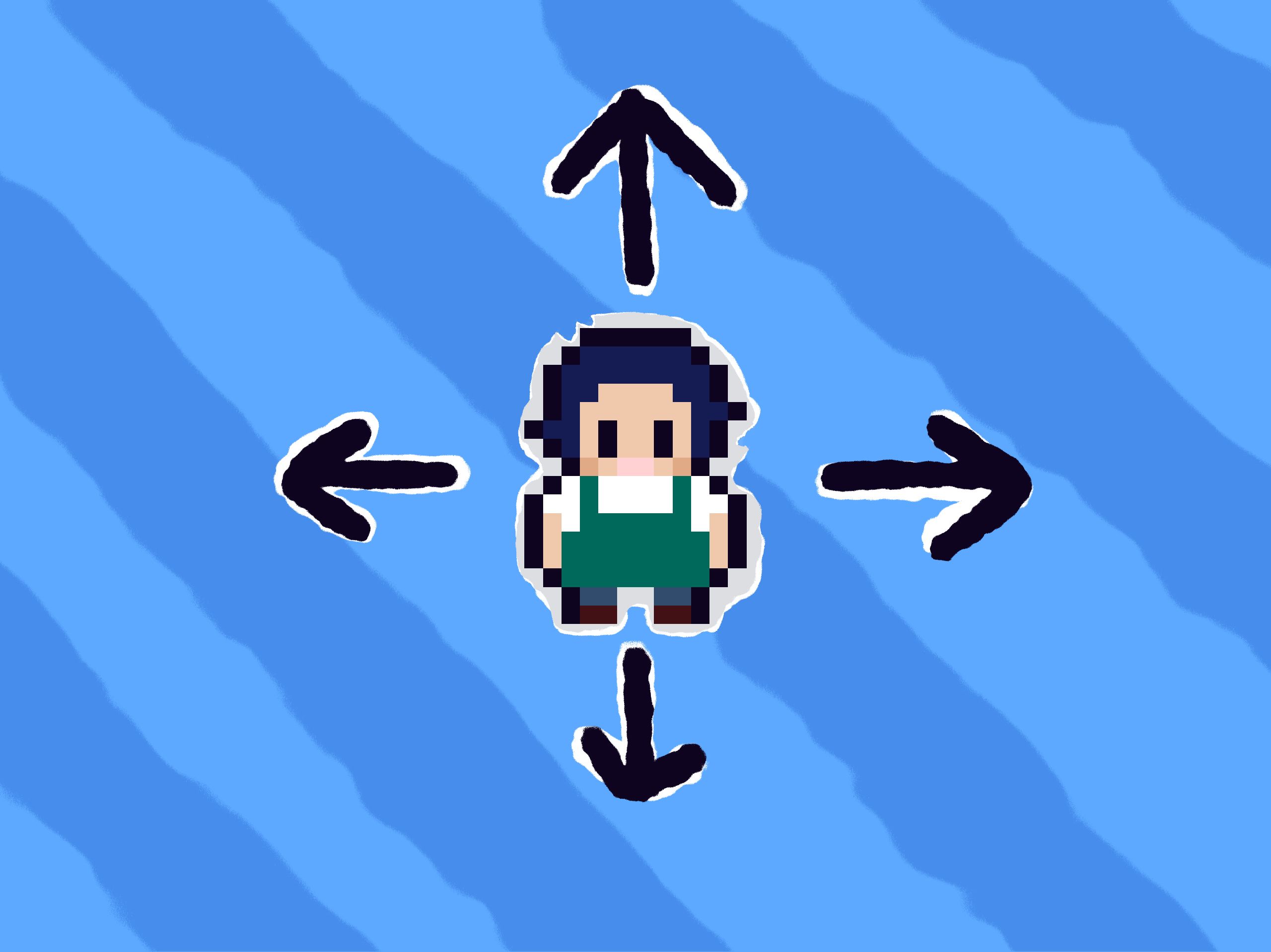
This week has been both very productive yet very busy with other things. I've been working a lot with my actual work, so I have not been able to work on the game this week as much as I wanted to. But, I believe I made some good progress despite the lack of time. Last week, I developed the AssetsManager and an InputManager, which I put to use this week! I've mostly focused on expanding the engine with something called ECS. I've also created a player entity that can be moved using input and lastly animations.
This was probably the biggest feature this week, and also very important. But what is it? Last week I mentioned that a game engine is essentially just a machine that loops over and over again. Now, to make the engine actually useful, we need data. What kind of data you might ask? Well anything the game handles essentially: The player, where is it? How much money do I have? What time is it? A player also of course do things, such as walking around, cooking food, purchasing furniture and groceries, talking to customers etc. All of this is data and events. All this data must be kept somewhere in the computer, but also be able to change, retrieve, delete etc.
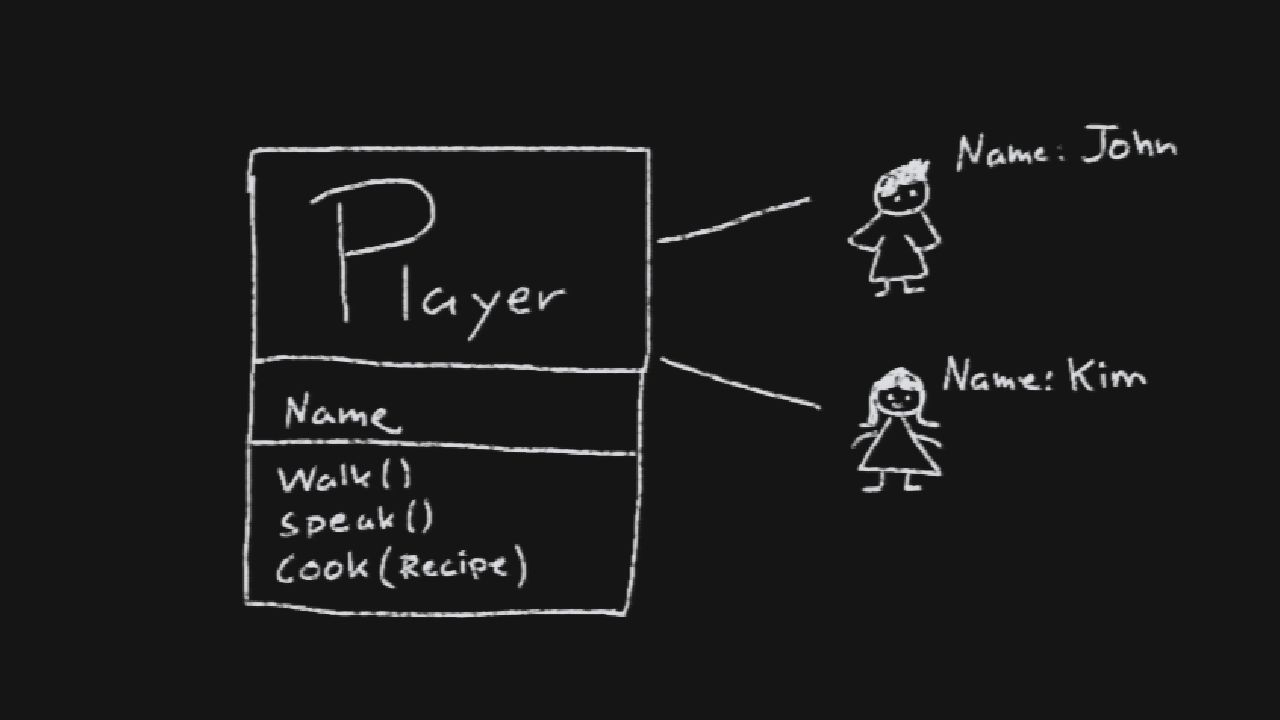
There are of course many ways to handle data in a game engine. Some developers like to do it in a OOP (object oriented programming) way, in which data is structured and stored in Objects. What's an object? Well, in the real world we're surrounded by objects. All objects have properties such as a color, shape, smell (and taste perhaps). Anything that defines the object really. Imagine in my scenario, a Player. A player would have a name, perhaps some cool clothing. It can do a bunch of things such as walking, cooking, talking etc.
In OOP, an object is defined by a class or a structure. You can view it as a blueprint of an object. You can then define attributes to said class, that each object can then have. If we run with our player example, we can define a Player class, with the name attribute and a couple of methods (things a player can do). A method is noted using parentheses.
Now imagine that we want to change so you as a player can occupy different skills, such as being a chef or a bartender. A good OOP solution here would to utilize polymorphism and create two new classes while keeping the player class as the base class. They both inherit the attributes and methods from the player class, but extend their specialty such as cooking and making drinks.
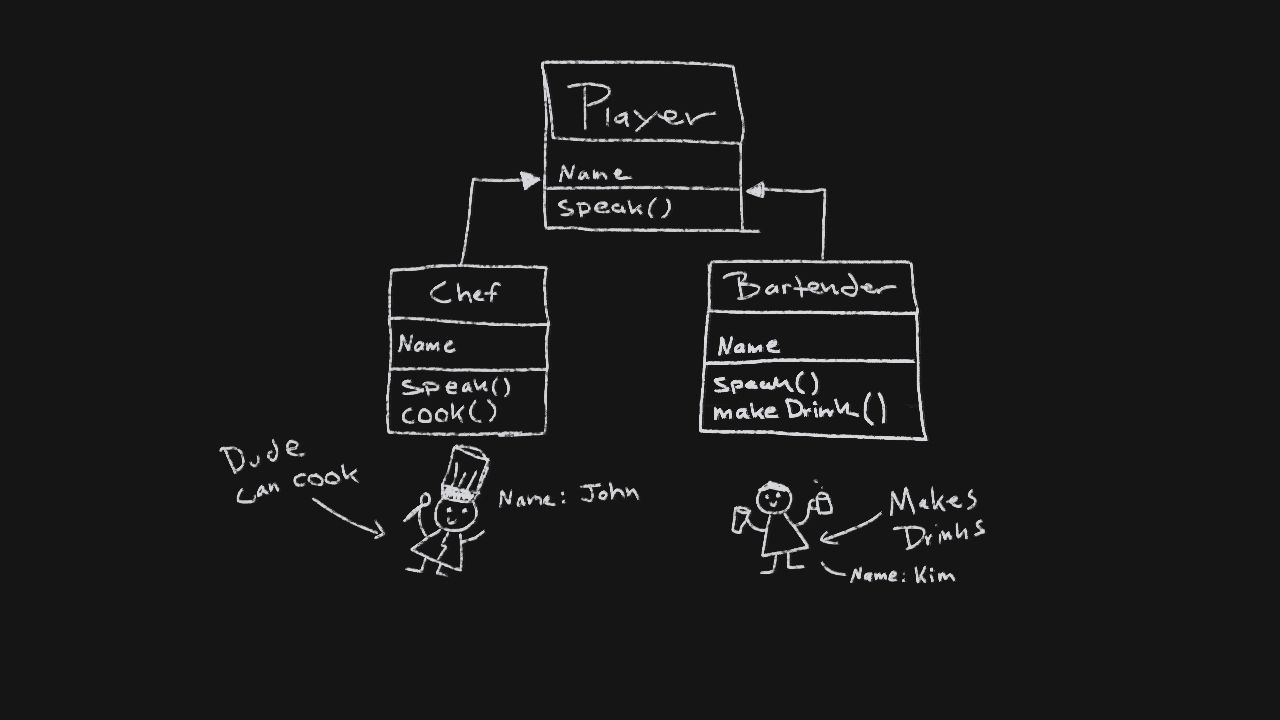
This is great and all, but like many times in life, there's a problem with this design. What if Kim, decides that making drinks is not her only passion, but she loves cooking as well? A crude solution would be to create a ChefAndBartender class that she inherits, and then re-implement the cook() and makeDrink() methods. We could also create classes based on abilities rather on roles, such as a "CanCook" class and a "CanMakeDrinks" class, that they then implement based on what they whant to do. This would be known as a strategy pattern.
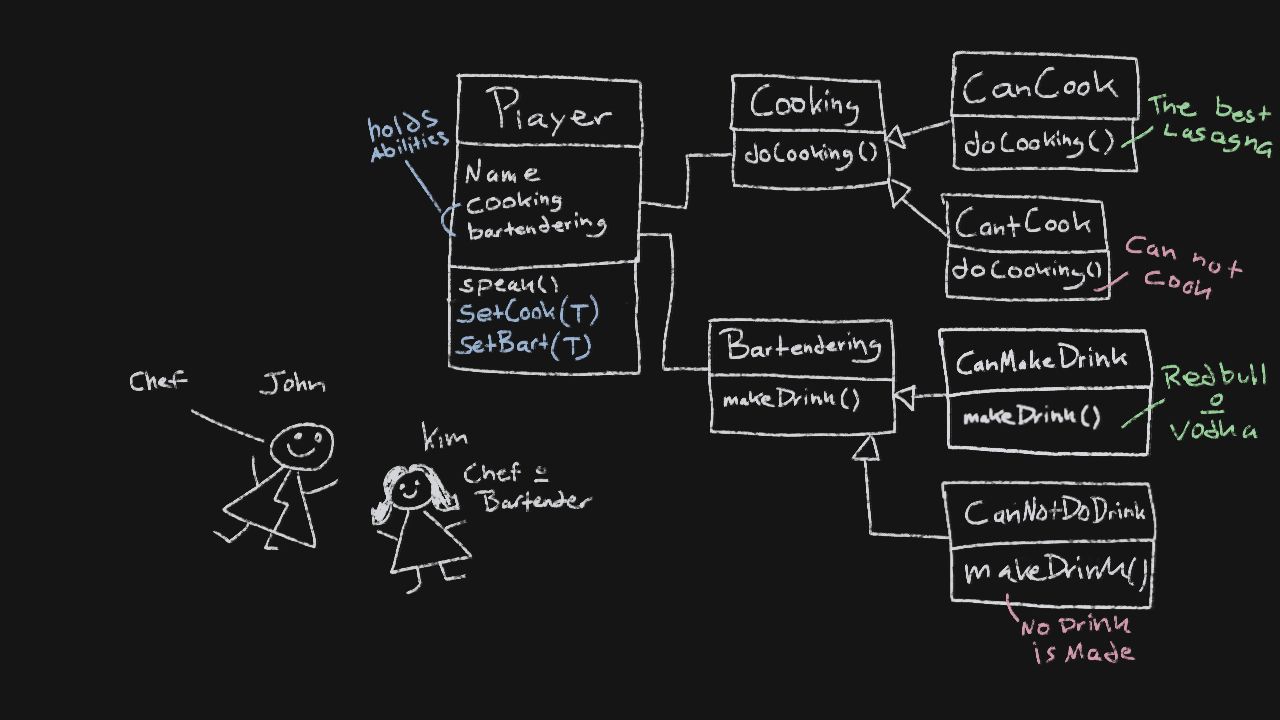
Now we have solved our previous issue! Right? Well, sort of. Imagine my game now, in which I want the player to have the freedom of doing anything they want. There will be endless of possibilities, so the amount of classes needed would be unmaintainable. You can already see seven different classes, just for this simple scenario of being a chef or bartender (or both). This is where traditional OOP can become a bit of an issue for complex systems that games can introduce, with many different scenarios and systems. So what's the solution? Here's where ECS (entity component system) comes in!
The entity component system (ECS) is a data driven approach that focuses on fixing scalability, and less on behavior. So rather then thinking in terms of objects such as a chef, bartender or even a player, we focus on pure data. I'll explain what I mean soon but just know that an entity is not an object per say, it's just an implicit identifier. Literally, an entity in my game is just an integer in a list, nothing more. I then create components such as position, sprite (or image), speed etc. These components themselves does not really make up anything by themselves. But, if I link an entity to any components, I can compose up essentially anything I want without a class explosion! The relationship between entities and components can be thought as a table structure.
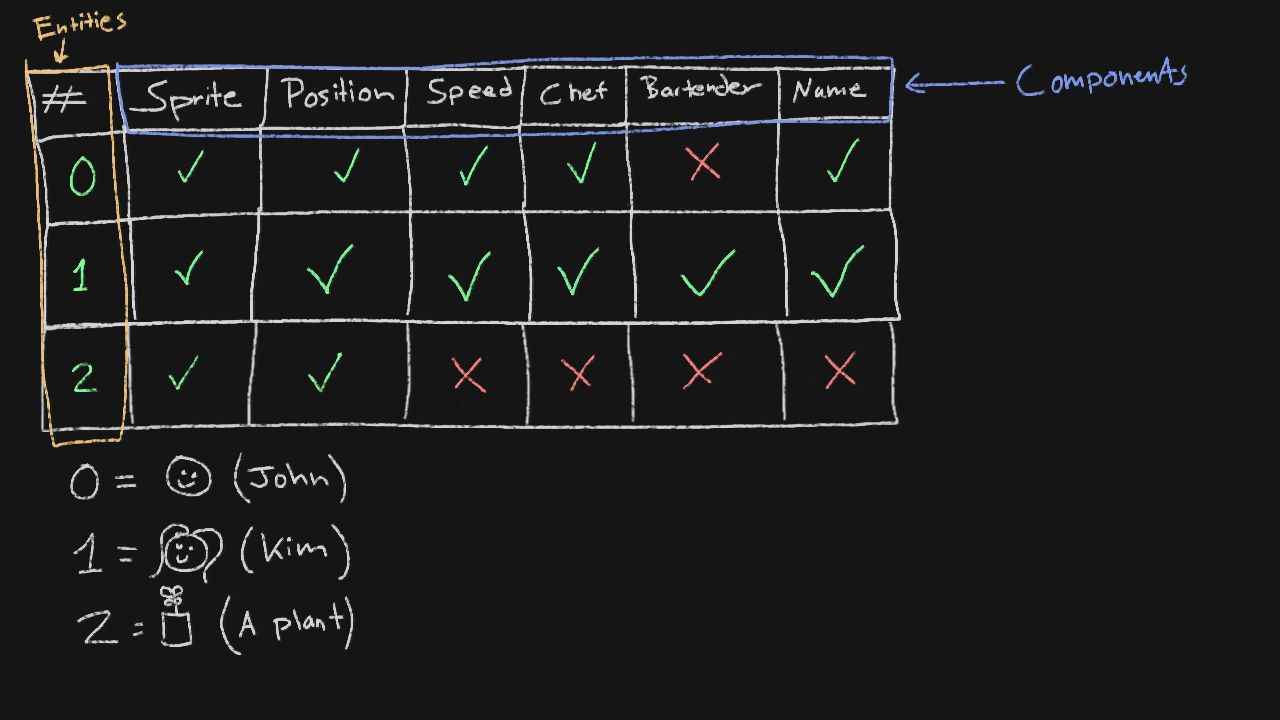
Now each entity is a number, that essentially "check" whatever components they have. Each entity are implicitly composed of many different components. This means that we get rid of the classes entirely. Now the number 0 is John, and 1 is Kim. I also made 2 as a plant, just to show how easy we can make new types of objects without any real effort. Imagine the amount of classes I would have to do just to make a plant previously. We could even make a plant that is a chef and a bartender with this approach! A component, is just data. Nothing else. So, a bartender could just be a string for example hinting that it's a bartender. Speed has a value, position holds x and y.
Now entities and components are nice and all, but alone they're quite useless. That's were systems comes in. Systems, takes entities and the components they're interested in, and do things with them in mass. For example, lets imagine that we have a CookingSystem. This cooking system essentially handles, well, the cooking. It would then take all entities, check if they have a Cooking component, and update that cooking component. The cooking component could of course hold data such as what recipe is it currently holding, or a simple boolean if its cooking currently. The idea however is that the heavy lifting should be in the systems, while components only hold data.
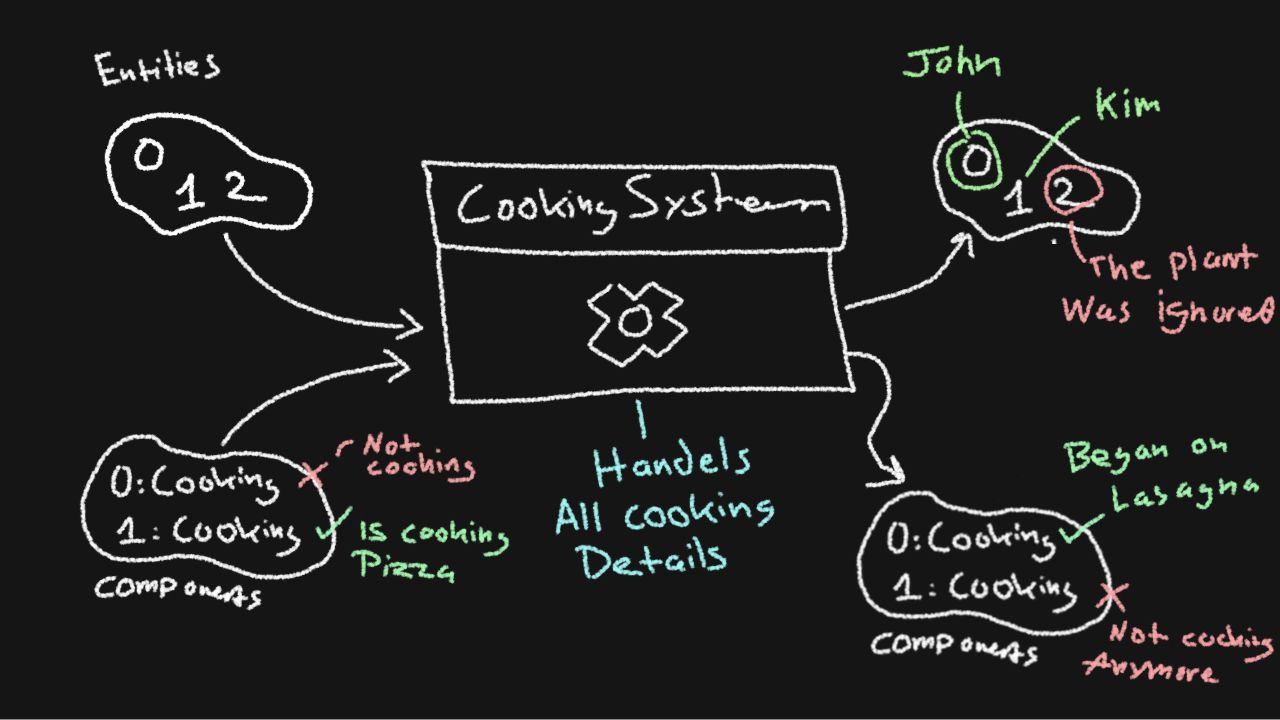
This approach have several benefits as mentioned before, but also performance. Because we essentially just iterate through lists of simple data and update them, rather then going through a bunch of object trees.
So this week I have implement a simple way of creating entities and assigning components, with my first two systems. RenderSystem and MoveSystem. The MoveSystem holds a reference of the InputManager we created last week. The main function is the process method. It takes in all the entities along with the components (the last two attributes just holds time, ignore them).
void MoveSystem::process(EntityManager& entities, ComponentManager& components, const sf::Time& delta){for (const Entity entity : entities.getAll()){if (!components.has<SpeedComponent>(entity)) continue;auto& speed = components.get<SpeedComponent>(entity);speed.setCurrent(sf::Vector2f(0.f, 0.f));if (components.has<TagComponent>(entity) &&components.has<AnimatedSpriteComponent>(entity) &&components.get<TagComponent>(entity).value == "Player"){auto& sprite = components.get<AnimatedSpriteComponent>(entity);handlePlayerMovement(speed, sprite);}normalizeSpeed(speed);speed.setCurrent(speed.current * delta.asSeconds() * 100.f);if (components.has<SpriteComponent>(entity)){components.get<SpriteComponent>(entity).sprite->move(speed.current);}if (components.has<AnimatedSpriteComponent>(entity)){components.get<AnimatedSpriteComponent>(entity).sprite->move(speed.current);}}}
It takes all the entities from the entity manager (it holds the entities). It checks if we have the components required for this particular system that I need, in order to move entities. Now, if it has a tag with the value player, it will apply speed from the input manager (so we can move using the keyboard for example). It then updates entities position of the sprite, or the animated sprite. And that's it! It will run through this piece of code over and over again. After that, the RenderSystem kicks in.
void RenderSystem::process(sf::RenderWindow& window, EntityManager& entities, ComponentManager& components){std::vector<sf::Sprite> sprites{};for (const Entity entity : entities.getAll()){if (components.has<SpriteComponent>(entity)){sprites.push_back(*components.get<SpriteComponent>(entity).sprite);}if (components.has<AnimatedSpriteComponent>(entity)){sprites.push_back(*components.get<AnimatedSpriteComponent>(entity).sprite);}}for (auto& sprite : sprites){window.draw(sprite);}}
The render system also takes in all entities, and ignore those who don't have a sprite (or animated sprite). It will then simply render each sprite on the screen. So, the render system does not care at all about the movement system. Nor does it care where the sprite is (the player for example). It only cares about if the entity has a sprite that it can render.
The game engine, will update constantly and let the systems process every entity and components. I also created something called World. A world basically just holds the world for the game. But most importantly, acts like a communicator for entities, components and all the systems.
void World::update(const sf::Time& delta){m_renderSystem.updateAnimations(m_entities, m_components, delta);m_moveSystem.process(m_entities, m_components, delta);}void World::draw(sf::RenderWindow& window){window.setView(m_camera.getView());m_renderSystem.process(window, m_entities, m_components);}
Putting it all together along many other things I created this week, I can finally move the player. And, I have a system in place to create components, entities and systems without having to worry about a class explosion! I also created animations and systems for handling animations, but I won't go into it right now. I will some day, probably.
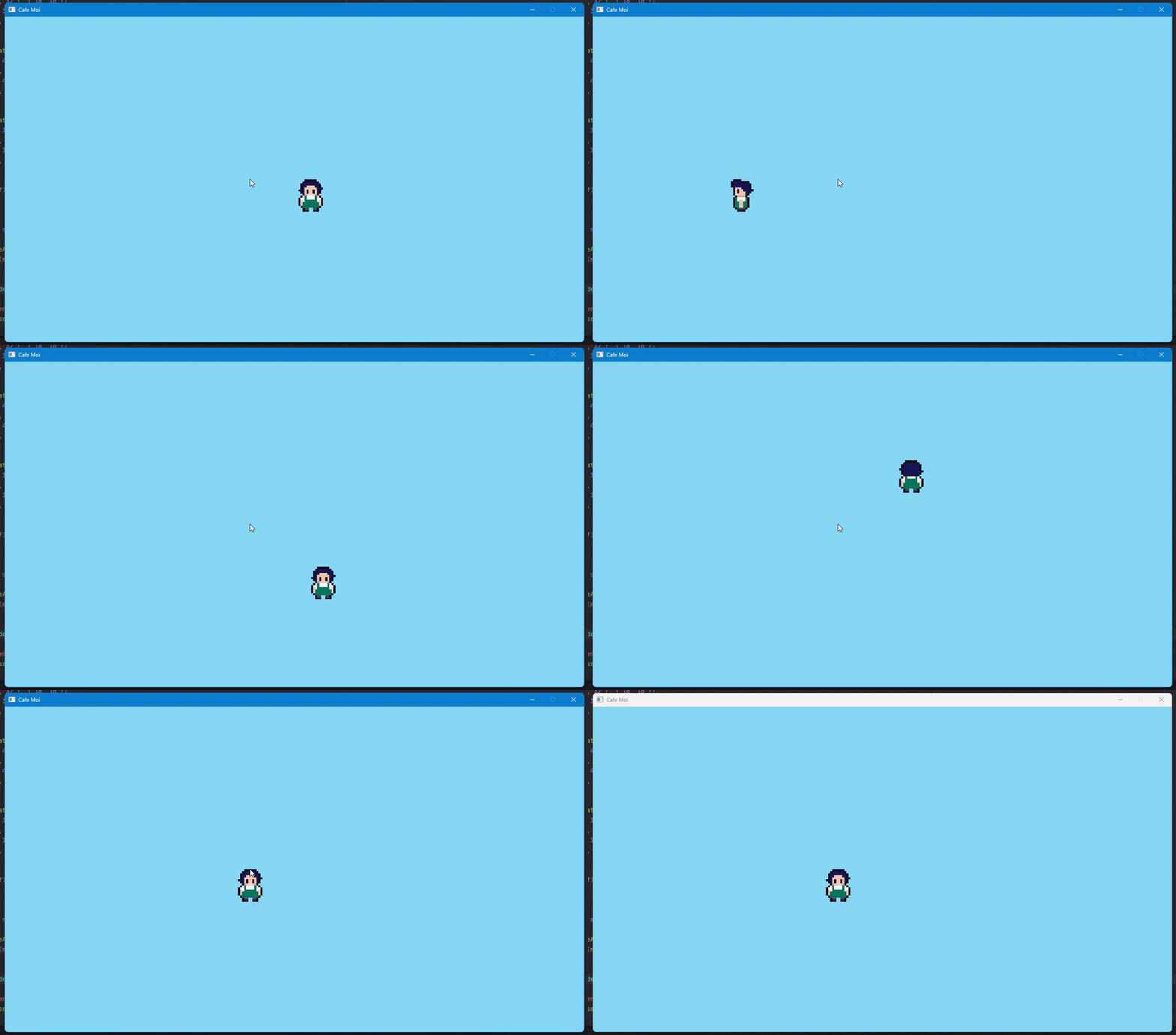
So that's it for this week! Hopefully I'll be able to work more often on my game next week, and have more progress. I will then focus on the building(s) that the player can be in!